Common layouts
Mainstream webpages are built from these parts:
Header
Visible at the top of every page on the site. Contains information relevant to all pages (like site name or logo) and an easy-to-use navigation system.
Main content
The biggest region, containing content unique to the current page.
Sidebar
1) Information complementing the main content;
2) information shared among a subset of pages;
3) alternative navigation system.
In fact, everything not absolutely required by the page’s main content.
Footer
Visible at the bottom of every page on the site. Like the header, contains less prominent global information like legal notices or contact info.
Examples
These elements are quite common in all form factors, but they can be laid out different ways. Here are some examples (1 represents header, 2 footer; A main content; B1, B2 things on the side):
1-column layout. Especially important for mobile browsers so you don’t clutter the small screen up.
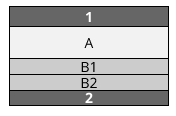
2-column layout. Often used to target tablets, since they have medium-size screens.
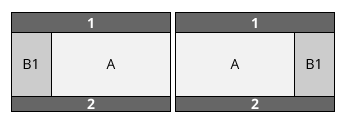
3-column layouts. Only suitable for desktops with big screens.
(NOTE: many desktop-users prefer viewing things in small windows rather than full-screen.)
Complex layouts.

REF
- https://developer.mozilla.org/en-US/docs/Learn/Common_questions/Common_web_layouts
- https://www.crazyegg.com/blog/best-website-layouts/
- https://www.wix.com/blog/2020/02/website-layouts/
- https://colibriwp.com/blog/website-layout-design-ideas/
- https://xd.adobe.com/ideas/principles/web-design/11-website-layouts-that-made-content-shine-in-2019/